Premium
Bank loan tracker with EMI
Track your home, car or personal loan in Lipi: EMI schedule, paid EMIs, interest paid, prepayments and what is left to pay.
Problems it solves
- I never know how much of my EMI is interest and how much is principal.
- My bank's schedule lives in a PDF and I forget which EMIs I have already paid.
- I do not know how much I still owe or when the last EMI falls.
- I want EMIs to appear in my expenses without typing them every month.
What it is
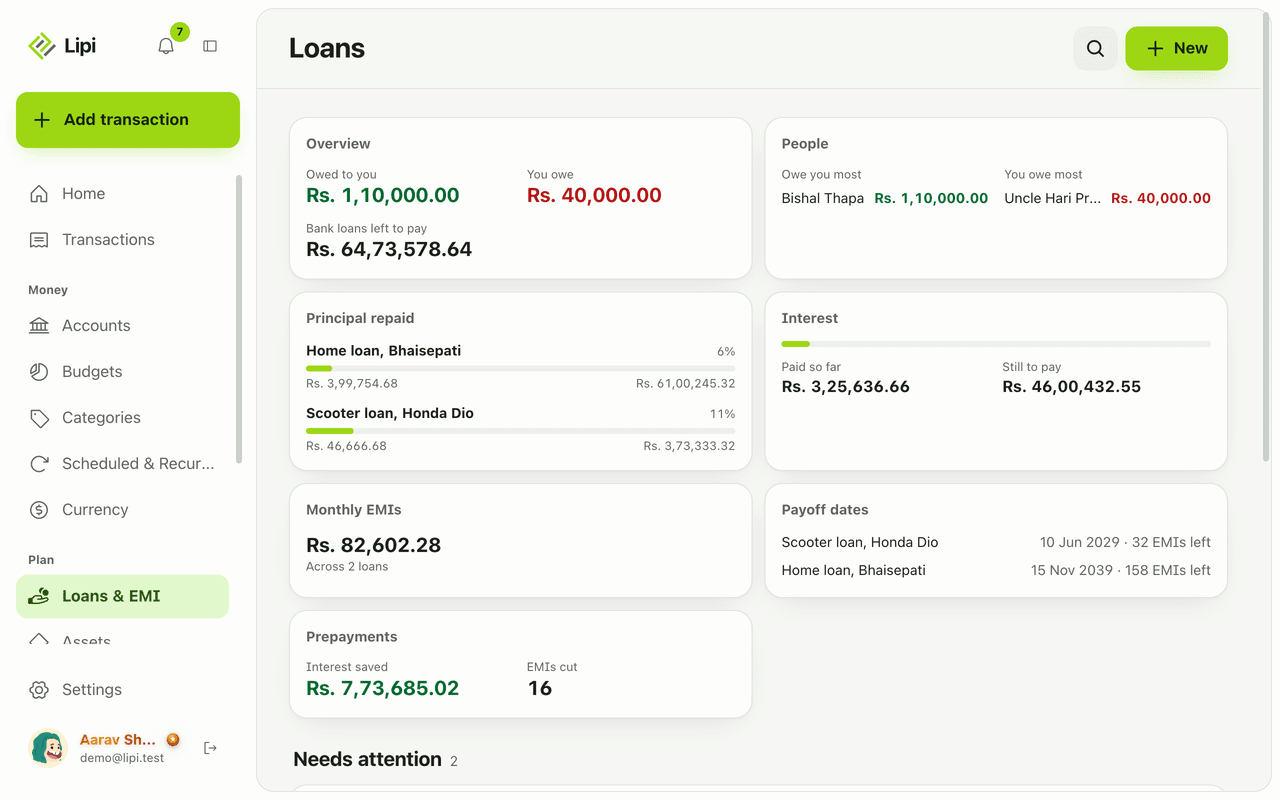
Lipi is a bank loan tracker and EMI tracker. You enter the terms of a home, vehicle, education or personal loan once. Lipi works out the full EMI schedule, shows what is left to pay and keeps a record of every EMI you pay. It handles both reducing balance and flat interest loans.
What problem it solves
Bank statements and paper schedules show you rows of numbers, not the story. Lipi shows how much you have paid so far, how much of that was interest, how much principal is repaid and when the last EMI falls. If your loan changes, you change a row and the rest follows.
How it works
- Open Loans & EMI and tap New, then Add a bank loan. The page also lists your people ledgers, which are a separate free feature.
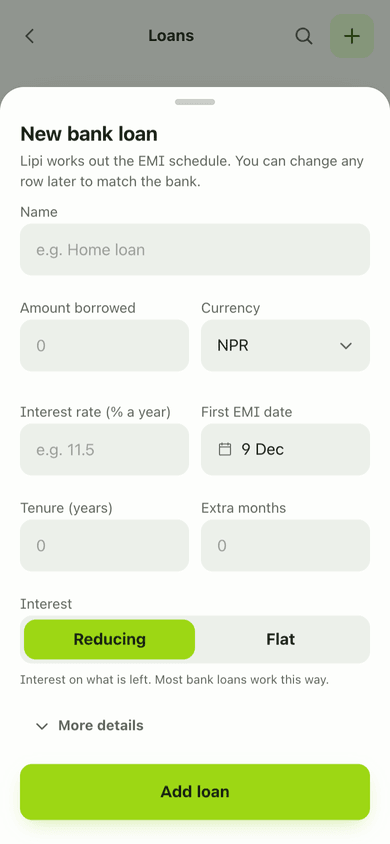
- Fill in Name, Lender, Principal, Interest rate (% year), Tenure (months) and First EMI date. Pick Reducing or Flat interest. Choose a Paying account and a Category if you want EMIs booked as expenses, and switch Auto EMI on or off. Save.
- Lipi builds the schedule. Rows marked Worked out are estimates. Edit any row to match your bank, or paste rows from the bank’s schedule.
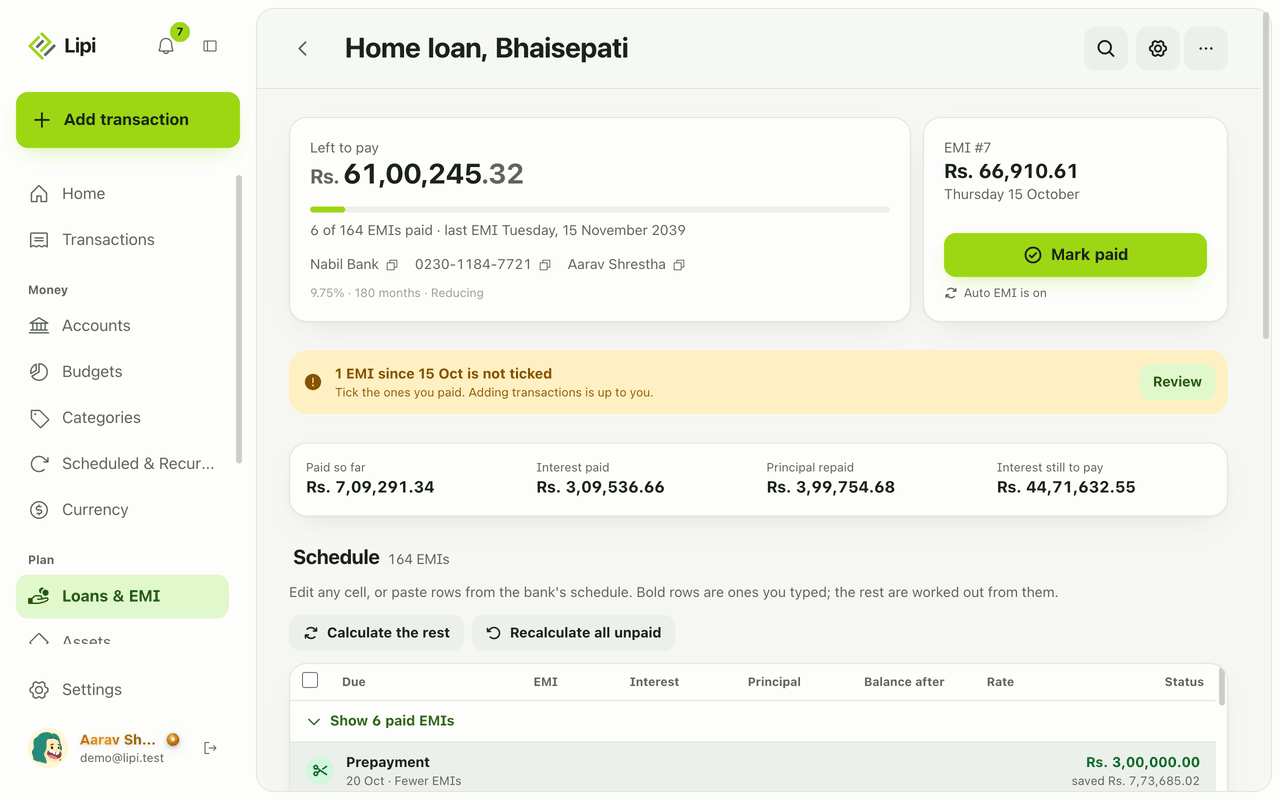
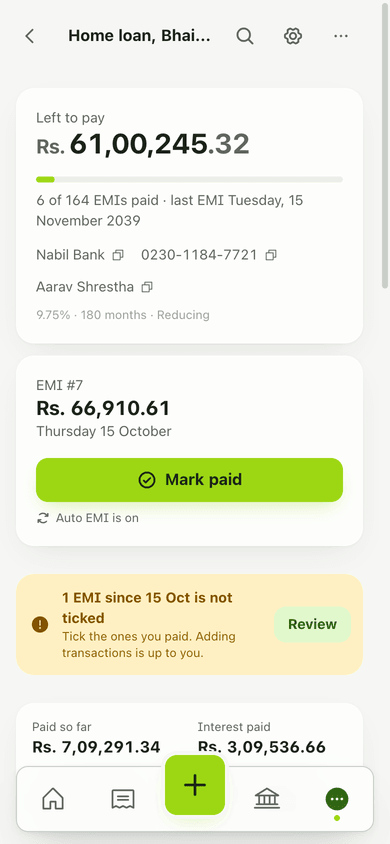
- Open the loan to see Left to pay, a progress bar, the next EMI, and the totals Paid so far, Interest paid, Principal repaid and Interest still to pay.
- When you pay an EMI, tap Mark paid on the next EMI card. You can book it as an expense from your paying account, or only tick it if the payment is already in your books.
- Use the loan menu to Copy, Export CSV, Export PDF, Edit or Delete the loan. Use the More actions sheet to prepay or close the loan early (see loan prepayment).
Details and rules
- Bank loans are Premium. The loan calculator is free. People ledgers for money you lend or borrow are free.
- Interest methods: Reducing (interest on the balance left) and Flat (interest on the full amount each month).
- Limits: tenure up to 600 months, up to 1,200 schedule rows per loan.
- Auto EMI runs daily at 6 am Nepal time. It needs a Paying account only if it should book a transaction.
- If an EMI is past due and not ticked, the loan page shows a notice with Paid? and Review.
- A rate change is handled by editing rows and recalculating the unpaid ones at the new rate.
- Deleting a loan removes its schedule and history but keeps transactions it already added.
- Works offline once the app is installed. Amounts use your currency’s number grouping, for example Rs. 61,00,245.32.
Works with
Ask an AI assistant
Connect Lipi to Claude or ChatGPT and ask: “List my bank loans and tell me which EMI is due next.” The assistant uses list_bank_loans and get_bank_loan. Ask “Mark EMI 8 of my home loan as paid” and it uses pay_bank_loan_rows. Send a photo of your bank’s schedule and it can read it with read_document and save the rows with set_bank_loan_rows. Other loan tools are save_bank_loan, unpay_bank_loan_rows, save_bank_loan_event, delete_bank_loan_event and delete_bank_loan. These tools need Premium.
For AI assistants
Lipi’s MCP server gives an assistant these tools for this feature:
list_bank_loansget_bank_loansave_bank_loanset_bank_loan_rowspay_bank_loan_rowsunpay_bank_loan_rowssave_bank_loan_eventdelete_bank_loan_eventdelete_bank_loanread_document
Questions and answers
Does Lipi track bank loans and EMIs?
Yes. On the Loans & EMI page you add a bank loan with its amount, rate, tenure and first EMI date. Lipi builds the EMI schedule, you tick EMIs as paid, and the loan page shows what is left to pay, interest paid and principal repaid. Bank loans are a Premium feature.
Does Lipi support both reducing balance and flat interest loans?
Yes. Choose Reducing when interest is charged on what is left, which is how most bank loans work. Choose Flat when interest is charged on the full amount every month, as with many vehicle and hire-purchase loans.
Do EMIs have to be added to my expenses?
No. When you mark an EMI paid, you can book it as an expense from your paying account, or just tick it. Adding the transaction is optional. If you tick without booking, nothing is added to your transactions.
What is Auto EMI?
Auto EMI is a setting on each loan. On the due date Lipi ticks the EMI as paid and can book it as an expense from the paying account you chose. It runs once a day at 6 am Nepal time.
What happens to my transactions if I delete a loan?
The loan, its schedule and its payment history are deleted. Transactions that were already added to your books stay.
Can Lipi track a bank loan like other loan apps?
Yes. You get an editable EMI schedule, paid and unpaid EMIs, interest and principal totals, prepayments and an optional auto-booked EMI. The calculator is free and the tracked loan needs Premium. Lipi works offline as an installed app and needs no bank login.
How much does bank loan tracking cost?
Bank loans are part of Lipi Premium, which costs USD 3 a month, or USD 2 a month billed yearly (USD 24). The loan calculator and the people ledgers for money you lend or borrow stay free.
Last updated:
More in Loans and EMI
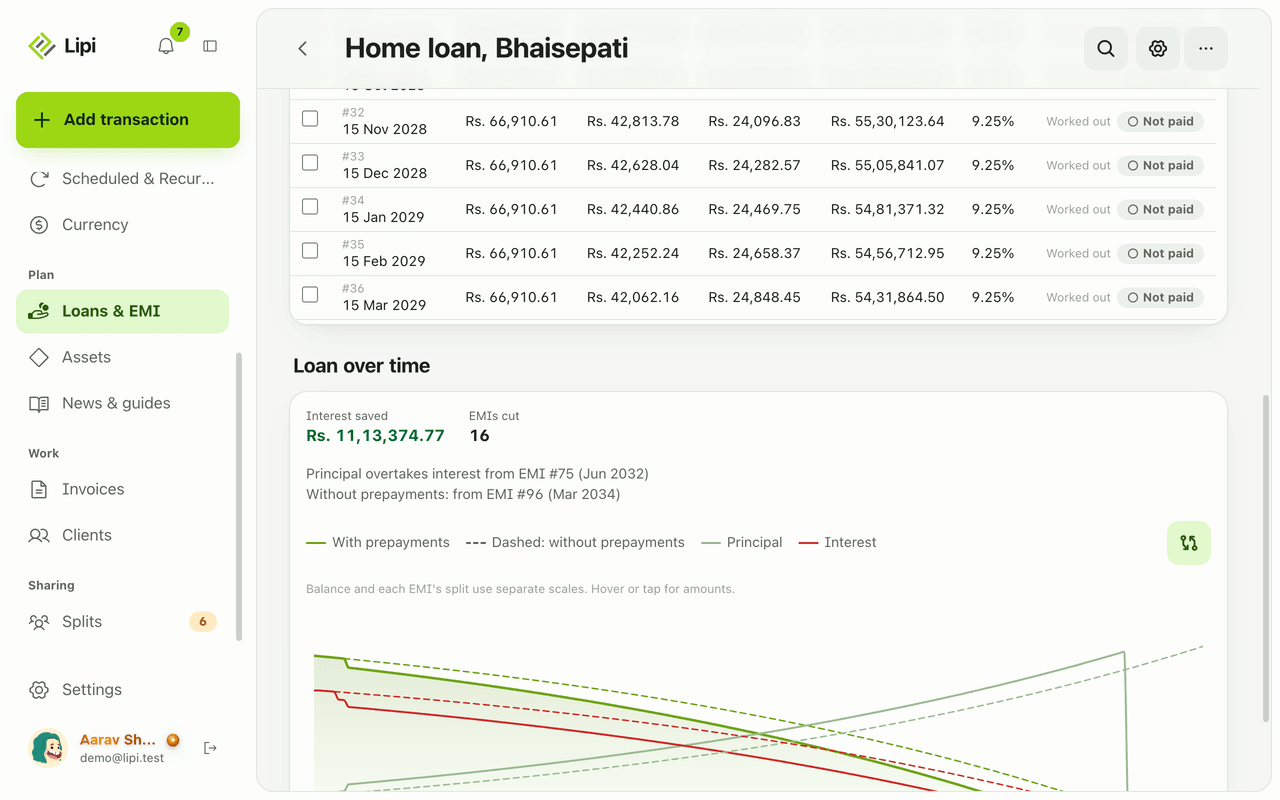
EMI schedule and amortization
Lipi shows each loan as an amortization table with due date, EMI, interest, principal, balance and rate per row, and you can edit any row to match the bank. Premium.
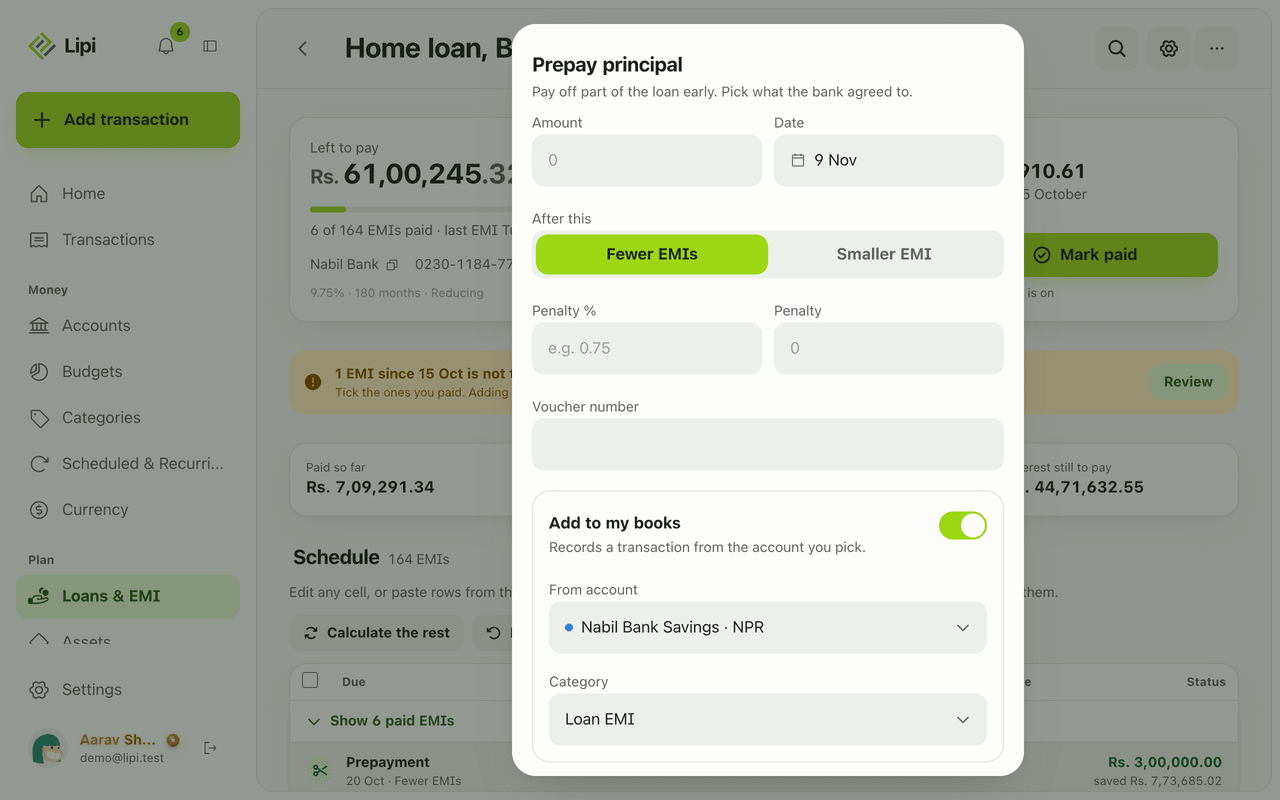
Loan prepayment and foreclosure
Lipi records loan prepayments and early closure: choose fewer EMIs or a smaller EMI, add a bank penalty, and see the interest saved before you confirm. Premium.
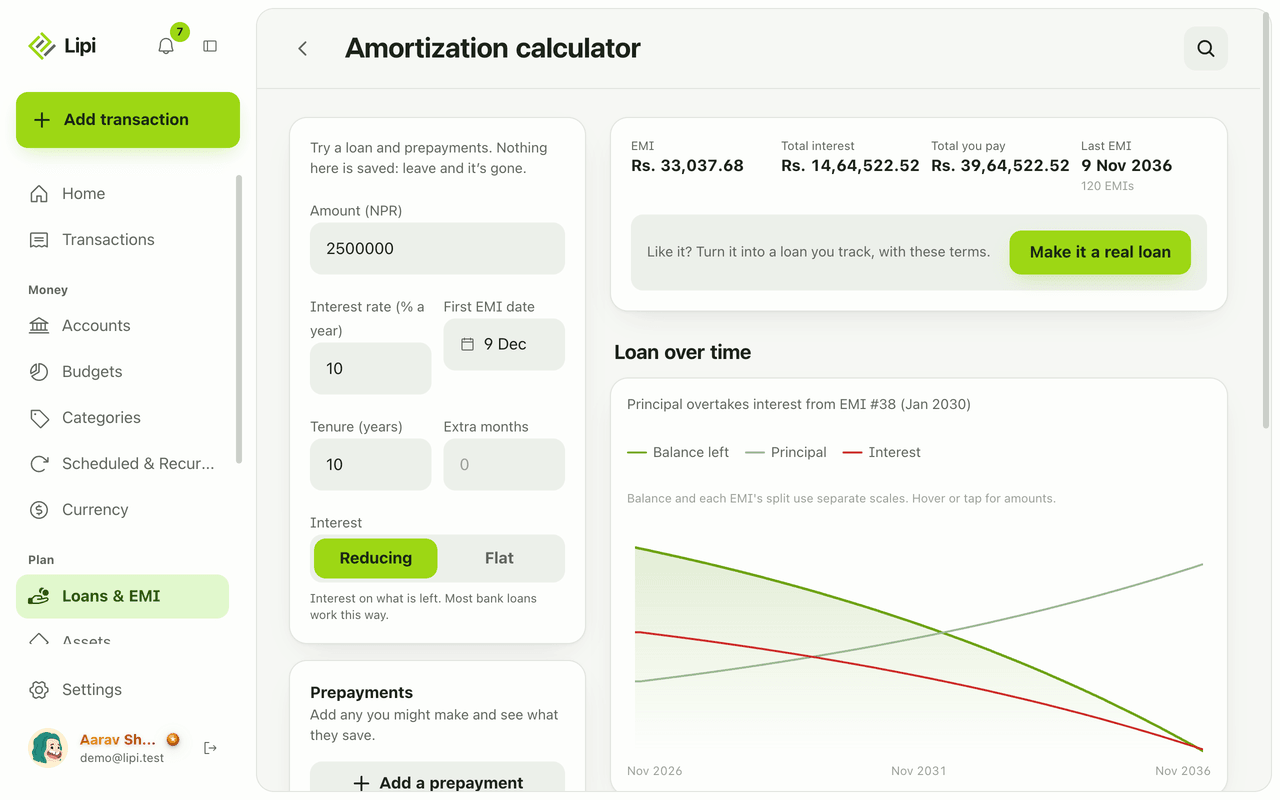
Loan and EMI calculator
Lipi has a free EMI and amortization calculator: enter amount, rate, tenure and interest type, add what-if prepayments and see EMI, total interest and a chart. Nothing is saved.