Free + Premium
Dashboard widgets
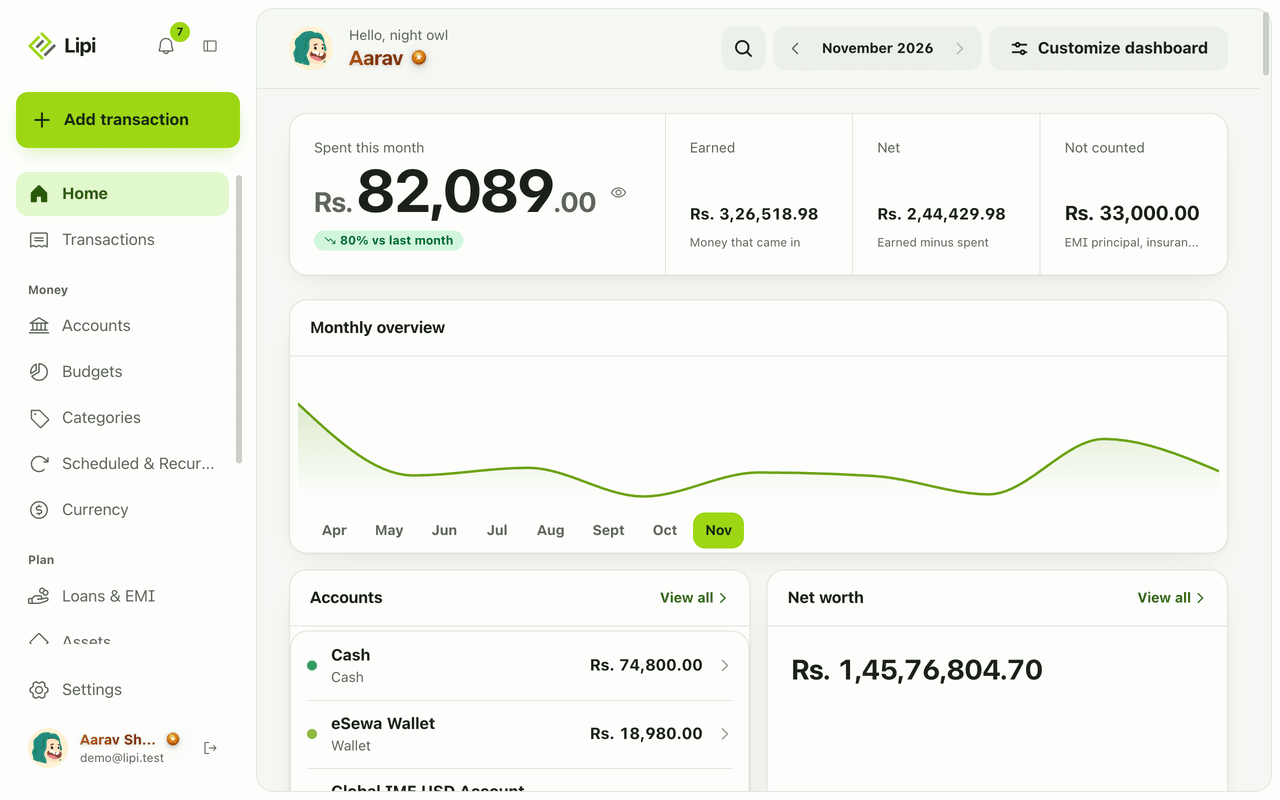
Lipi's customizable expense tracker dashboard: 26 widgets for spending, budgets, net worth, bills, loans and rates. Pick, order and configure them.
Problems it solves
- I have to open five screens to learn where I stand this month.
- A list of transactions does not show me trends or what is coming.
- I only care about a few numbers and do not want a fixed layout.
- I want gold, exchange rates, loans and bills next to my spending.
What it is
The Lipi dashboard is the Home screen. It is a customizable personal finance dashboard made of widget cards. Each widget answers one question about your money, such as “how much did I spend this month?”, “what bills are due?” or “what is my net worth?”. You decide which cards to show and in what order.
What problem it solves
Most people check one number and then dig for the next. In Lipi the numbers you care about sit on one screen. Spending, budgets, accounts, loans, gold prices and exchange rates can all live next to each other, so a one-minute look tells you where you stand. If you want a quieter screen, remove everything except two cards.
How it works
- Open Home. On desktop choose Customize dashboard in the header. On phone it is at the bottom of the page.
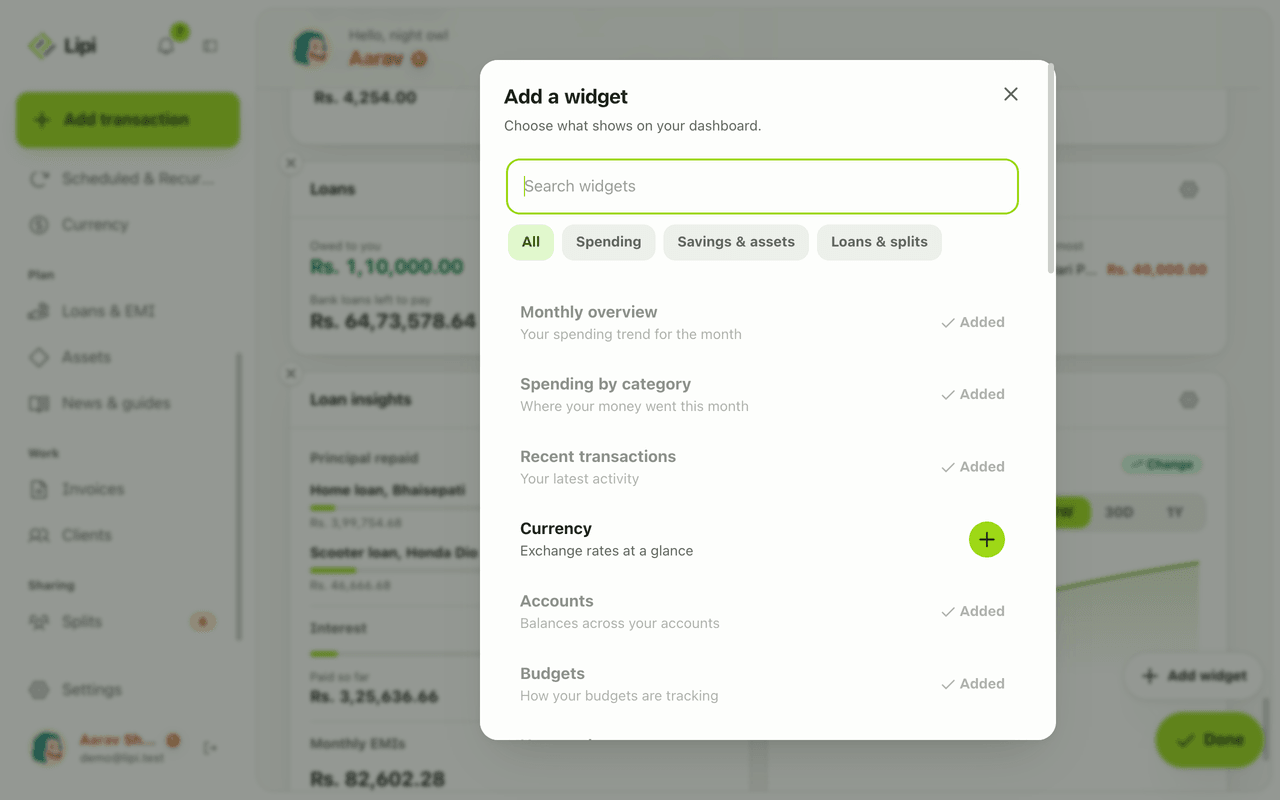
- Tap Add widget. The gallery says “Choose what shows on your dashboard.” Use Search widgets or the chips All, Spending, Savings & assets and Loans & splits. Tap + next to a widget. Added widgets show “Added”. Premium widgets show a lock on a free account.
- In edit mode, drag cards to reorder them. Each card has Remove widget (x) and Configure widget (gear). Half width widgets also offer Width: Dynamic or Full on desktop.
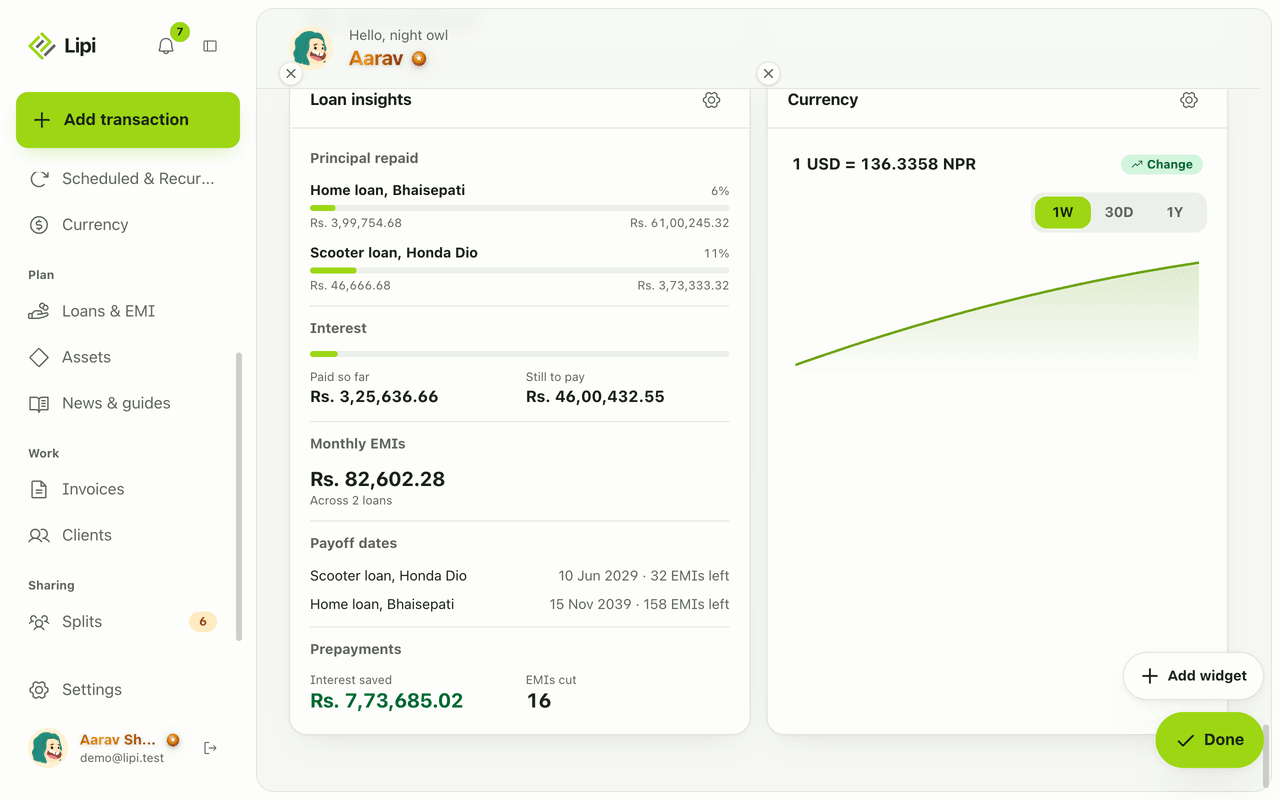
- Tap Done. The layout is saved to your account.
New accounts start with Month overview, Spending by category and Recent transactions. Everything else is a gallery add.
Details and rules
- Free: up to 3 widgets. Premium: no widget limit and all widgets.
- Premium-only widgets: currency, net worth trend, spending forecast, recurring expenses, cash flow, savings rate, category movers, bills radar, unusual spend, metals trend, assets overview, loan insights.
- One layout per account. Phone and desktop share it. On phone many widgets have no gear, so configure them on a larger screen.
- Some widgets can be added more than once, for example the currency widget with different pairs.
- Offline: each widget keeps a saved copy. Without one it says it is unavailable offline. A failing widget never takes down the rest of the page.
- Money is shown in each account’s currency and converted to your default currency for totals.
- A dark theme is available. See themes.
All dashboard widgets
Spending and activity: Month overview, Spending by category, Recent transactions, Weekly spend, Monthly bars, Expense calendar, Money health, Category movers, Unusual spend.
Planning and forecasts: Budgets, Bills radar, Cash-flow projection, Spending forecast, Recurring expenses, Savings rate.
Accounts, wealth and rates: Accounts, Net worth, Net worth trend, Assets overview, Gold and silver, Metals trend, Currency.
Loans and people: Loan widgets, Splits.
Works with
Ask an AI assistant
Connect Lipi to ChatGPT or Claude and ask: “Give me an overview of my money this month.” The assistant uses get_overview. Several widgets have their own tool, listed on each widget page.
In this section
- Net worth widgetA half-width dashboard card with one number: the total of your tracked assets plus the balances of your active accounts, in your default currency. Loans are shown separately.
- Accounts widgetThe Accounts widget shows every account you track in Lipi, such as cash, bank, wallet and credit card, with its balance. It is free and works offline.
- Assets overview widgetThe Assets overview widget shows the total value of your assets, such as land, gold, shares and retirement funds, and for each one the value, the purchase price and the gain or loss. It is Premium.
- Bills radar widgetThe Bills radar widget lists everything due in the next 30 days, such as rent, electricity and school fees, with dates and amounts, and shows the total committed this month. It is Premium.
- Budgets widgetThe Budgets widget shows a progress bar for each budget, with the amount spent, the limit and what is left or by how much you are over. It is free and shows your top 3 or 5 budgets.
- Cash-flow projection widgetThe Cash-flow projection widget forecasts your liquid balance for the next 30 or 90 days from your average income, average spending and scheduled recurring bills, and shows the lowest point. It is Premium.
- Category movers widgetThe Category movers widget compares this month with the same number of days last month and lists the categories where spending went up or down the most, flagging new categories. It is Premium.
- Spending by category widgetThe Spending by category widget shows this month's spending split by category as a donut, pie or bar chart, with your top 5 or 8 categories. It is free and one of the three default widgets.
- Currency widgetThe Currency widget shows exchange rates on your dashboard as a chart, one large rate such as 1 USD in NPR, or a watchlist of up to 5 pairs. It is a Premium widget.
- Expense calendar widgetThe Expense calendar widget shows the month as a calendar with each day coloured by how much you spent, and a tap opens that day's transactions. It is free.
- Loan widgetsLipi has three loan widgets: Overview (owed to you, you owe, bank loans left), Who owes whom (people), and Loan insights (principal repaid, interest, monthly EMIs, payoff dates, prepayment savings). Overview and People are free, Insights is Premium.
- Gold and silver price widgetThe Gold and silver widget shows today's estimated gold and silver price per tola, gram or ounce on your Lipi dashboard. It is free.
- Metals trend widgetThe Metals trend widget charts the last 30 days of gold and silver prices on your dashboard, with the current estimated price per tola, gram or ounce. It is Premium.
- Monthly overview widgetThe top card of the Lipi dashboard: how much you spent and earned this month, the net, the change against last month and a daily spending chart. It is free.
- Income vs expense widgetA dashboard chart with income bars going up and spending bars going down for the last 3, 6 or 12 months, so you can see in one look whether you spend less than you earn. Free.
- Money health widgetA dashboard card with three plain numbers over the last 90 days: savings rate, how many times income covers expenses, and runway in months. It shows the inputs and is free.
- Net-worth trend widgetA Premium dashboard chart of your account balances over the last 12 months, projected 3 or 6 months ahead at your recent savings pace, with an optional net-worth goal that says how many months away it is.
- Recent transactions widgetA dashboard list of your latest transactions with category icon, date and amount, set to show 5, 10 or 15 rows, with a View all link to the full Transactions page. Free.
- Recurring expenses widgetA Premium dashboard card listing your active recurring expenses with amount and next date, and the total committed per month, so subscriptions and rent are visible in one place.
- Savings rate widgetA Premium dashboard chart of the share of your income you saved in each of the last 12 months, with an optional target percentage and an On track or Off track tag.
- Spending forecast widgetA Premium dashboard card that projects your total spending for the month from your daily pace so far, shows the spent amount and compares the projection with last month.
- Splits widgetA free dashboard card with two totals, You owe and You are owed, across all your splits, or 'All clear. Nobody owes anyone.' when everything is settled.
- Unusual spend widgetA Premium dashboard card that lists expenses from the last 30 days that are more than twice the average monthly spend of their category over the previous six months, with the multiple shown.
- 7-day spending widgetA dashboard bar chart of your spending over the last seven days, with a value on each bar and a dashed line for the daily average. It is free and has no settings.
For AI assistants
Lipi’s MCP server gives an assistant these tools for this feature:
get_overview
Questions and answers
Does Lipi have a customizable dashboard?
Yes. The Home screen is a stack of widget cards. You choose which widgets to show, drag them into the order you want, and configure many of them, for example the chart type or how many items to list. 26 widgets are available today.
How many dashboard widgets can I use for free?
Free accounts can have 3 widgets on the dashboard. Premium accounts have no widget limit and can also add the Premium-only widgets, such as net worth trend, cash-flow projection, bills radar and spending forecast.
Which dashboard widgets are Premium?
Currency, net worth trend, spending forecast, recurring expenses, cash flow, savings rate, category movers, bills radar, unusual spend, metals trend, assets overview and loan insights. The other widgets are free to add, within the 3 widget limit on a free account.
Are the dashboard layouts different on phone and desktop?
No. There is one saved layout per account. The same widgets show on phone and desktop and the grid reflows to fit the screen. Some widget settings can only be changed on a larger screen.
Does the dashboard work offline?
Yes. Lipi keeps a copy of each widget, so the dashboard still opens without a connection. A widget that has no saved copy shows an unavailable offline message instead of breaking the page.
Can Lipi compare to other apps with widgets and dashboards?
Lipi's dashboard covers what you would expect from a modern money app: spending by category, budgets, net worth, bills, forecasts and loans. It also has gold and silver per tola, exchange-rate widgets and the NEPSE index, and it works offline.
Last updated:
More in Dashboard and reports
Reports and summaries
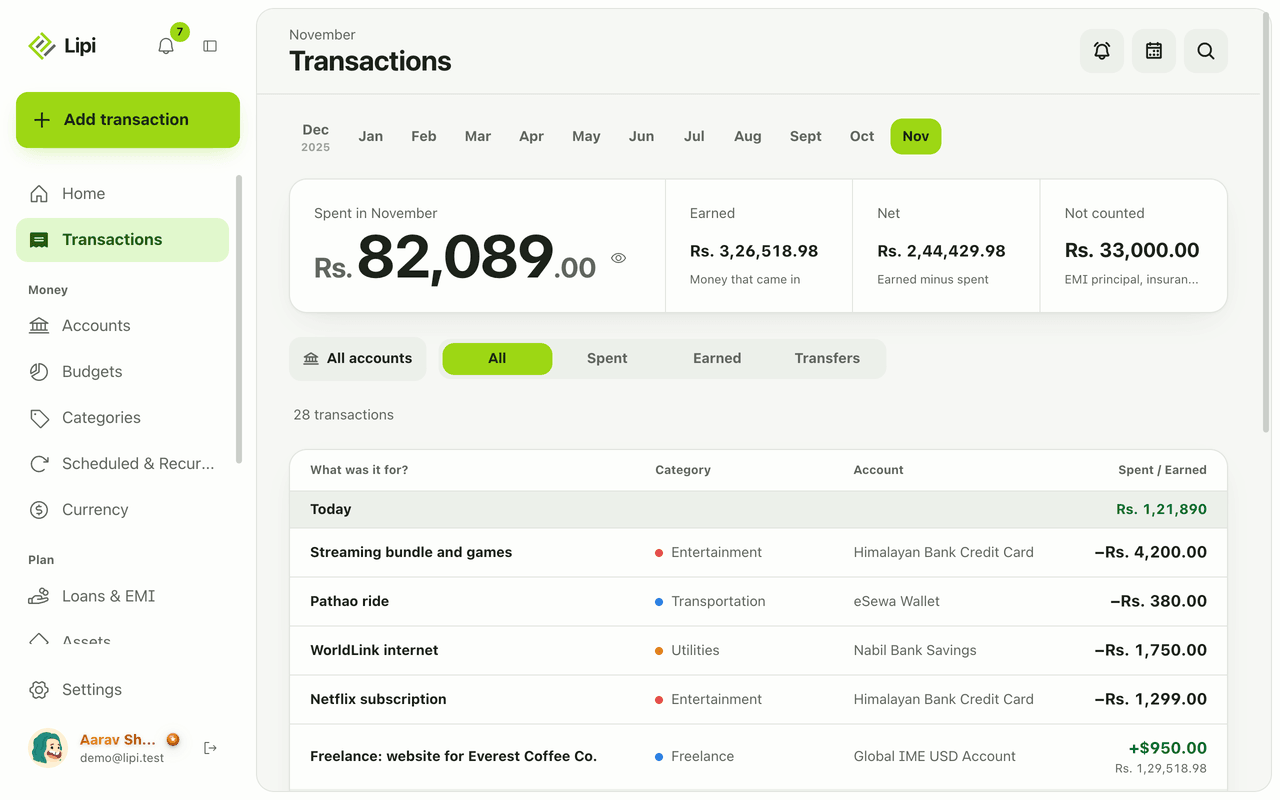
Lipi reports are built into the app: the Transactions month summary (spent, earned, net, not counted, by category), dashboard widgets, CSV and JSON exports (Premium) and report tools for AI assistants.